
Mesh通信の仕組み
回線ステータス
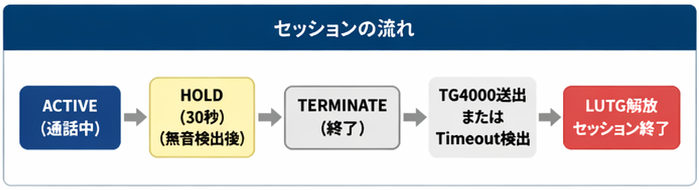
- ACTIVE = 移動局送信中
- HOLD = Meshセッション発生中で誰も送信していない (30秒保持)
VTERM基準、VTERM確認不可の場合は音声ストリーム
30秒間何もトラフィックが無いとMeshsセッションは切断されます。 音声フレームを確認するとACTIVEに戻りまた新たなHOLDに移行します。 - STANDBY = Meshセッションが終了・消滅し次のセッション待受け状態、通常のローカルSFR運用
通信制限
1セッション
一連のMeshセッションは18分を上限としています。 意図しない接続が長時間継続しないための安全弁です。
正規のMeshセッションが途中で切れることなく継続し、18分に到達した際には
- 現在送信週のストリームはその送信が終了した際に強制Time Outし、その旨音声案内が放送されます。
- 18分到達までに30秒のHOLDタイムで自動切断、または手動切断は発生した場合はそこまで。
1ストリーム
3分で配信切断 (ほとんどのSFRでは180秒TOTが設定されています)
送信者によりPTTが離されると「VTERM」という制御信号は無線機から送出されます。 システムはこれを感知しストリームの終了を検知します。
しかしながら、伝搬状態が悪かったりバッテリー切れ等何らかの理由で送信中に途中で途切れてしまうと無線機から「VTERM」が送出されない場合があります。 この際HSのTX Hangoutにより補完され疑似VTERMがHSよりサーバーに送られ、サーバーではストリームが通常終了したと判断します。
また、RF側ではVTERM が発生していても、HSとサーバーのネットワーク上で通信異常がありVTERMが喪失された場合にはサーバーがストリーム中断後5秒でストリーム強制終了と判断します。
セッションごとの参加局数
Origin/Target側 SFRを合わせて20局 (TG4000/ID4000の切断制御のために管理されています) ほぼ通常のラウンドQSOは問題なく対応できると思います。
セッション中の排他制御
Meshセッションは SFR 1:1のペア通信です。 ペア以外のSFRからのアクセスリクエストは接続拒否され、当該ペアが話中(BUSY)である音声案内が配信されます。 またペアになっているSFRからペア以外のSFRへのmesh-TGが送出された場合も無効として扱われます。
例) 711111と711112でMeshセッション中に711113から711111宛に接続要求があった場合には711113で711111はBUSYである旨アナウンスが流れます。
また、セッション中のペア内から他のSFR基地局宛の要求を誰かが送信した場合も、ドロップされます。
例) 711111と711112でMeshセッション中に711111にアクセスできる他の局が711113宛の接続要求を送出した場合。
Dashboard
SFR-Meshにはウェブ上から閲覧できるリアルタイムモニターとしてダッシュボードが用意されています。
現在発生しているMeshセッションの状況、オンライン中のSFR基地局、通信履歴などを閲覧できます。
Mesh-LUTG Active Session Monitor
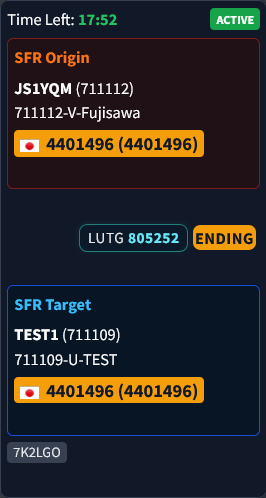
ダッシュボード上部に、Meshセッションごとに発生中のみカードが表示されます。 セッション回線切断後は60秒終了状態で表示され、その後自動で消滅します。
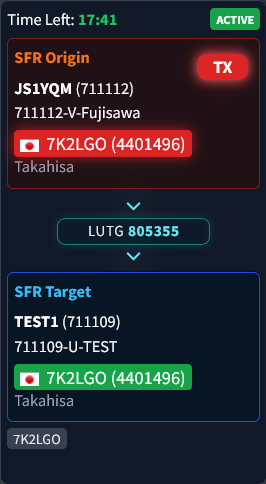
- Time Left: 当該セッションの残り時間 (残り1分未満になると赤字)
- Status: ACTIVE(送信中/受信中)/ HOLD (無送信)/ ENDED(セッション切断)
- SFR Origin: Meshセッション回線起動側(呼び出し元)のSFR基地局の情報
- 音声通信参加局: 現在送信中のコールサイン(RadioID)、名前が表示され赤色で点滅、受信中は送信者のコールサインが緑で点灯
- LUTG: このMeshセッションを制御しているLUTG番号を表示、通信方向に合わせて矢印が流れます
- SFR Target: Meshセッション回線接続先(呼び出し先)のSFR基地局の情報
- 送受信局: 現在送信中のコールサイン(RadioID)、名前が表示され赤色で点滅、受信中は送信者のコールサインが緑で点灯
- セッション全体参加局: 当該セッションで音声フレームが確認されたユーザー局(参加者)の最新10局を一覧表示(SFR基地局から送信された音声ID受信による音声フレームは除外)
注: セッション全体参加局にはSFR基地局のIDは自動音声IDの送出等でほぼ必ず含まれてしまうために意図的に除外しています。 また、履歴情報からも除外しています。 但し、まれに管理者が基地局送信機かで直接送信するケースもある為リアルタイムの動態を把握するためカード内のOrigin/Target個別の履歴には表示させています。
このセッションモニターは2秒ごとにブラウザー表示の裏でデーターのみをリアルタイム更新しています。
送受信の切替の制御ではPTT押下を覚知して、送信元とそのセッション内での正しい送信先を判断し接続を確保、配信開始まで通常0.31秒かかります。 その0.31秒の処理中の瞬間に2秒の更新が発生した場合に方向が未定義のステータースが2秒間表示される状態が発生します。 その表示内容による混乱や誤解を防止する目的で以下のような移行フェーズ表示を挟む設計になっています。
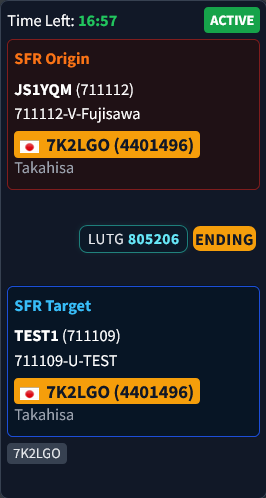
送信開始直後は方向性を持たず「STARTING」の黄色表示
送信終了(マイクバック)直後は「ENDING」の黄色表示
尚、2秒間隔の更新発生のタイミングとアクセスしている回線速度などの条件によっては、移行フェーズ表示が現れずにそのまま通常の表示が出現することが通常発生し異常ではありません。(単なる表示タイミングが理由で、サーバーでは同様に処理が進んでいます。) 本システムでは通常遅延がある公衆回線からの接続に置いて表示順序よりもリアルタイム表示性能と結果の速報性能を優先しています。
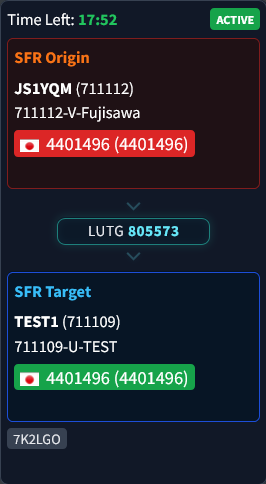
なお、本システムにおいてはじめて表示されるRdioIDの場合はキャッシュが無いために当初ID番号のみでコールサインが表示されないことがありますが、2回目以降にはコールサインがキャッシュされ表示されます。
無線機の設定
通常通り接続したいSFR基地局の設定に合わせて下さい。
主なSFR基地局はCC1/TG1ですが、一部CC3/TG3などの場合にはその設定で問題ありません。 各SFR基地局のHSとサーバーでリライトし吸収しています。
CH設定にてTX Admit設定は必ず「Color Code Free」にするとスムーズなやり取りが可能です。
「Always」や「Carrier」の場合はシステムや、SFR基地局、他局の送信終了を待たず、かぶせて送信可能な状態のため、SFR局に接続されている音声ID装置等による送信と重なり接続異常の原因となります。 SFR-Mesh接続以外の運世においても、今後のDMR普及において、基地局が展開される中で、隣接エリアと異なるCC設定を活用しセル状にサービスエリアを充実・展開できるのがデジタル通信の利点でもあります。 是非ご活用ください。
メーカにより名称が異なることがあります。 以下のリンクに簡単な説明があります。

注意
現在実証実験中で、日々プログラムの改善作業などを行っております。 予告なく再起動などを行いますので回線が途中で切れることもあります。 予めご了承ください。
音声品質のセルフテストを目的とした機能で、システム全体で1回線のみです。
エコーテストは録音をして自局の音声ストリームの品質を確認するためのもので、ユーザーにとって接続のテストをする上で大変有用で必要な機能です。 試験電波の発射手順で運用し、是非活用して下さい。
操作方法
切断する
まずは接続方法の前に切断方法です。
手動TG4000切断
Meshセッション接続中で誰も送信していない状態=HOLD中にTG4000(Group Call)、またはID4000(Private Call)をダイアルしPTTを押すとMeshセッションを切断できます。 その際Origin/Target両方のSFR基地局に対してシステムから英語で音声アナウンスが流れます。
音声アナウンスの例
- Origin=711111/Target=711112でMeshセッション発生中の切断
”711112 Not Linked”
当該MeshセッションのTarget TGを宣言して切断を案内します。
手動切断を行える局は以下の範囲に限定されます。
- 当該Meshセッションにおいて音声フレームを確認できた局の直近20局
- Origin/Target SFR基地局のID(SFR管理者による強制切断操作用)
これにより、そのMeshセッションに関連しない局による意図しない切断制御を防止しています。
自動TG4000切断
30秒のHOLD Time outになった場合に、システムにより当該セッションが自動的に切断され、自動音声案内が流れます。
音声アナウンスの例
- Origin=711111/Target=711112でMeshセッション発生中の切断
”711112 Not Linked”
当該MeshセッションのTarget TGを宣言して切断を案内します。
利用したいSFR基地局を30秒以上ワッチして何も聞こえなければMesh接続は発生していないということになります。
接続する(Origin SFR側)
Target側ではMeshセッションとしてのリンク通信科かSFRローカル通信科かの見分けはつきません。 Target側ではどのSFRからの接続かは分からないのでアナンスするとMeshセッションであることが分かりやすいです。
- 接続元(Origin)となるSFR局のCHに合わせる
CH設定は通常のデジピーターアクセス時同様。 - Manual DialでTargetのTG番号を入力
この時Group Callモードになっていることを確認して下さい。 Private Callモードでは動作しません。 一般的には#を押すことでGCとPCが切り替わります。 - PTTを押し、送信開始とともに送話する
Target SFRがBUSYでなければ、Meshセッションが確立し、直ちに音声が配信され、そのままお話を続けます。 この時配信開始後1~2秒で送信を止めるとすぐにTarget側の自動ID音声装置が起動することが多々あり、その後Orign側のID装置もそれに反応して送出されるタイミングがあります。また相手先の受信局がMesh回線に接続されている状態にあることが分からずローカル通信のつもりで応答するケースもありますので、最初の接続時にどこSFR基地局からMesh回線で接続しているかをアナウンスして頂けるとお互いに状況が分かりやすく親切かと思います。 ご協力をお願いいたします。 例) 自局のコールサインなどに続けて「藤沢デジピーターから、青梅デジピーター向け SFR-Mesh経由です。」のようなアナンスをして頂けると相手方の心の準備が整うと思います。注: この最初の送信ストリームはTarget TGで送信されていますので接続元SFRをワッチしている他の局はこの送信を受信できない状態です。(すべてのTGを受信可能な無線機や、そのSFR基地局に割り当てられているTGがRX Groupに含まれている場合は、受信復調できますので便利ですが。) - 交信はTG1で続行
返信がある時点で通常はManual Dialモードは解除されるのが一般的ですが、ホームや戻るボタンを押すなどしてそのCHの標準設定状態に戻します。 Meshセッションが解除されるまではTG1のままでTarget SFRに接続可能です。 ラウンドQSOなどで複数の局が送信する際もTG1で送信して下さい。SFRの設定がCC1/TG1の場合はTG1で交信を行いますが、もし他のTGが標準TGとなっている場合(例:CC3/TG3など)の場合はTG3となります。 各SFRの通常TGのまま交信続行できる仕組みです。注: HOLDタイムは30秒です。 最後の送信またはTarget側からの受信完了から30秒経過するとMeshセッションが解除されます。
もし、何らかの理由でMeshセッションが消滅した際は操作2を繰り返します。
通常最後の通信(音声ストリーム)から30秒で自動的にMeshセッションは切断されますが、更新終了後は不要な配信を防止する観点から手動TG4000を入れて切断することをお勧めいたします。
応答する(Target SFR側)
- SFR局のCHに合わせワッチ
CH設定は通常のデジピーターアクセスと同様。 - そのままTG1で応答する
Meshセッションが有効な間はTG1のままでOrigin SFRに接続可能です。 ラウンドQSOなどで複数の局が送信する際もTG1で送信して下さい。SFRの設定がCC1/TG1の場合はTG1で交信を行いますが、もし他のTGが標準TGとなっている場合(CC3/TG3)の場合はTG3となります。 各SFRの通常TGのまま交信続行できる仕組みです。
注: HOLDタイムは30秒です。 最後の送信またはTarget側からの受信完了から30秒経過するとMeshセッションが解除されます。 Target側ではMeshセッションとしてのリンク通信科かSFRローカル通信科かの見分けはつきません。
また、音声配信が開始されるまでに0.29秒ほどの立ち上がりコストが発生します。 この立ち上がり部分では頭切れになることがありますのでMeshセッションの最初の部分は一呼吸おいて話始めることをお勧めします。 実際にTarget SFRで音声バーストが発生するのはおおむね3秒後ぐらいになります。 一度セッションが確立すると立ち上がりコストが減りますのでレスポンスが良くなる傾向があります。
通信中にRF環境の変化により無線機からのVTERMをHSが受信できない場合はHSのRF HangtimeによりVTERMが付加されますが、HSとサーバー間での通信障害や揺らぎがある場合はVTERMを確認できません。 この直後にRFが復旧した場合やHSのネット通信が回復した場合にはセッションは維持したまですが、ストリームは新規となり、セッション内でのストリームの更新後再接続に0.29秒程の立ち上がりコストが生じます。 その後14ms~29msの配信再開コストも発生します。